
Nova provides a complete industrial visualization solution that can be accessed via a web browser. By default, access to the visualization system must be over HTTPS and the user accessing the display pages must be authenticated. Nova provides configuration options to override these defaults, and to allow either HTTP or anonymous access from specific IP ranges.
Allowing Insecure Access
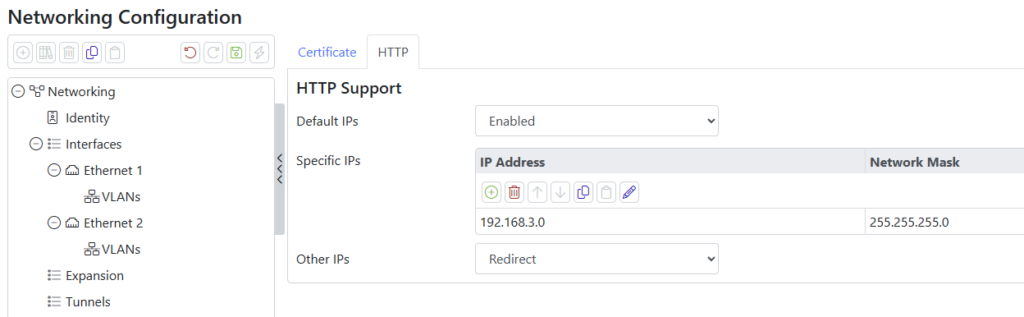
Most devices allow HTTP access only from APIPA addresses on an interface that itself has an APIPA address or from the Docker IP address of the host operating system. These defaults allow for easier initial configuration of a device, and for a browser running on the host device to access the visualization system more efficiently. To allow HTTP access from other IP addresses, navigate to the Web Server section of the Network configuration and enter one or more IP addresses and netmasks. A netmask of /32 or 255.255.255.255 will match a single address.
Allowing Anonymous Access
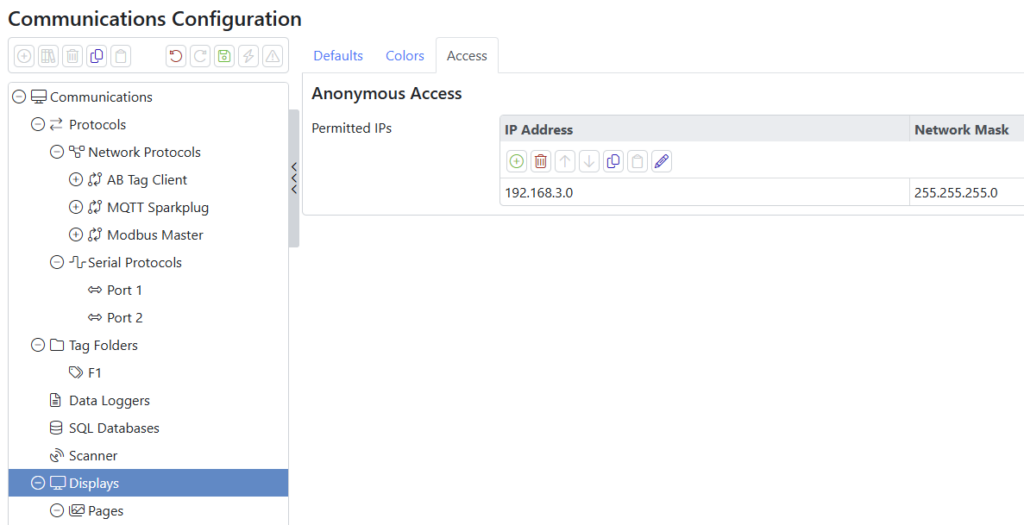
Anonymous access to the visualization system is achieved via the special /static/AnonHmi.html URL. Access to this URL is permitted only from the Docker IP address of the host operating system so as to permit use by kiosk browsers. To allow access from other IP addresses, navigate to the Access tab of the Displays section of the Communications configuration and enter one or more IP addresses and netmasks. As above, as single host can be specified with a /32 or 255.255.255.255 netmask.
If you device has an IP address of 192.168.100.10, your anonymous HMI will be at:
https://192.168.100.10/static/AnonHmi.html
Replace the https prefix with http if you have enabled and want to use insecure access.
Otherwise, you may wish to refer to the article on avoiding certificate errors.
Enabling the Virtual Keyboard
If the device accessing the visualization system does not have a real keyboard or a touchscreen emulation available, append ?kb=1 to the URL to enable Nova’s own virtual keyboard.
