
We recently added SQL queries to Nova, allowing you to exchange data with databases like Microsoft SQL Server or PostgreSQL. These queries execute a specific SQL statement, and optionally store the resulting data. For some applications, storing this data in a Nova string tag as a JSON array works well: You can take the data and display it using the JSON Array primitive, or parse the data using expressions with the JsonGet function. But for other applications, we needed an easier way to access the individual elements of the reply. We have thus added a so-called JSON splitter to the query definition, allowing you to select elements within the JSON array that represents the result set, and to store them in other Nova tags or communications items.
Consider a query that gets columns named One, Two and Three from a table where the key matches a Nova tag:
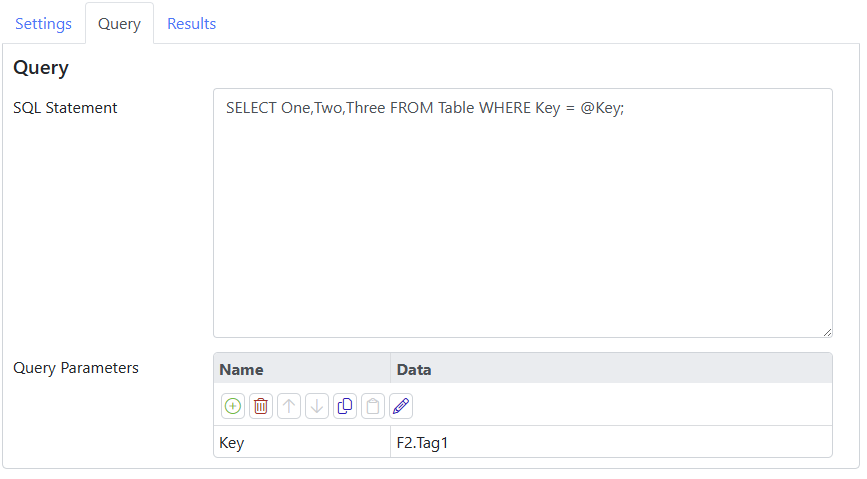
You can see the SQL statement with the @Key binding using F2.Tag1 select the desired record.
On the Results tab, we configure the options like this:
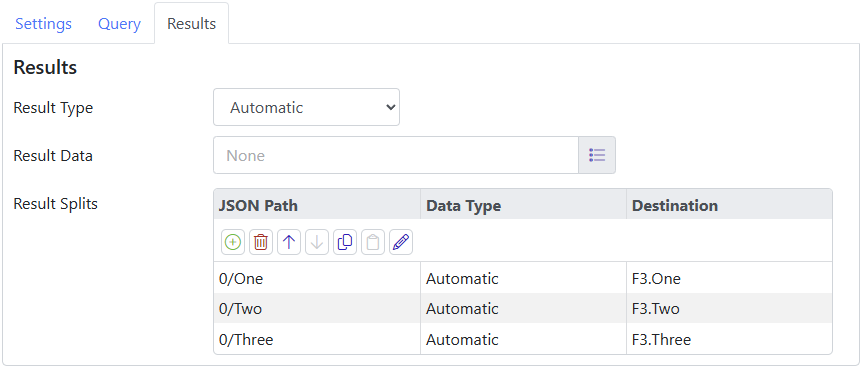
We skip the Result Data, which would normally receive the JSON array that represents the returned row set, and instead we define a number of Result Splits, each with its own JSON path and a tag in which to store the results. The initial 0/ is required since the query results always take the form of an array, even if it only contains one row, and we must thus select the first row if that is what we want. The balance of the path selects the column that we want, allowing each column to be stored in its own tag.
We’re going to use the JSON splitter soon to implement a generic REST API agent, allowing customers to access any standard REST endpoint without our having to write a customer driver. This is a great example of how Nova’s focus on the re-use of common components drives the rapid addition of features!