
Nova allows you to store JSON objects or arrays within string tags, and to thereby pass complex data items around within your application. SQL Queries, for example, can return a JSON array that contains the rows that you have SELECT-ed from a database, and JSON Object and JSON Array primitives can be used to display these data structures with a couple of clicks. This article describes some of the common techniques for working with JSON in your application.
JSON Paths
Many of the JSON manipulation techniques within Nova rely on paths to select elements within JSON data. A path is a sequence of elements separated with forward slashes, with each element selecting a child object within the JSON. The result of the selection will depends on the type of the selected element. If the element is an integer, floating-point number or a Boolean, a numeric value will be selected. If the element is a string, a string will be selected. And if the element is a JSON object or array, a string that contains the JSON representation of that data will be selected.
Path elements may be of various types:
| Type | Example | Description |
|---|---|---|
| Field | name | Return the element within an object that has the field name name. |
| Element | 2 | Return the third element of an array. Array indices are zero based. |
| Search | name=test | Search an array of objects for the first entry where name field of the object is equal to “test” and return the that object. |
| Search | data@name=test | Search an array of objects for the first entry where name field of the object is equal to “test” and return the data field of that object. |
In each case, if a field does not exist or if the index is beyond the array length, a null value is returned.
As an example, consider the path:
data/0/sensorMeasurements/value@type=phaseAMaxCurrent_Ampere
This will look at the top-level JSON object and find the array called data. Within that array, it will select the first element, and within that element it will match the array called sensorMeasurements. Within that array, it will search for an entry where the type field is “phaseAMaxCurrent_Ampere” and return the associated value field.
JSON Expressions
If you have a data item that contains JSON data, you can manipulate it with the following functions:
JsonSize(json)
Returns the number of elements in an array.
JsonGet(json, path)
Returns the element of the JSON data that is defined by the specified path.
JsonEdit(json, path, value)
Returns the JSON data with the field selected by the specified path updated to the specified value. The path may not contain search elements, but only fields or array elements. Note that the JSON data is not modified in place, but rather a new JSON construct is returned. To update the original JSON, the result must be assigned back to the source.
JsonAppend(json, path, value)
Returns the JSON data with the array selected by the specified path updated by appending the specified value. The path may not contain search elements, but only fields or array elements. Note that the JSON data is not modified in place, but rather a new JSON construct is returned. To update the original JSON, the result must be assigned back to the source.
JSON Splitting
SQL Queries and REST APIs call can store the resulting data in two ways: They can either take the entire result and store it in a single data item, or they can parse it according to a number of sub-elements using is called a split table.
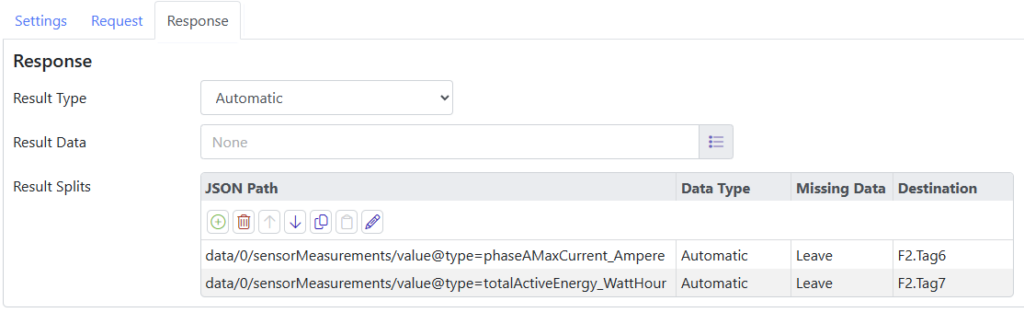
The split table scans the resulting JSON data for elements that match the supplied paths, and stores the resulting data in the specified data items. If an element is not present, you can select whether you want the data value left at its current value, or if you would like it set to a zero value or empty string, depending on its data type. Remember that the paths may refer to arrays or objects, in which case either the JSON functions or the JSON primitives can be used to process the data further, or it can be passed to communications drivers that understand JSON types, such as the Allen-Bradley EIP driver.
JSON Primitives
The display editor provides two primitives for displaying JSON data, these being the JSON Object and the JSON Array. The former takes a JSON object and displays its fields as a list of key-value pairs, while the latter displays each element of the array on a separate row of a table, with the columns representing the fields of each row. Both are shown in the picture below.

Each primitive will default to obtaining the key names and column labels from the JSON field names. Since this may not display the names that you wish your users to see, Nova allows you to define a data type that maps the JSON fields to human-readable names with per-element formatting. These data types may be defined on the primitive itself or via the Data Types section at the top of the configuration.
