
Nova can integrate with SQL databases in three distinct ways:
- It can sample data items and push them to a table within adatabase;
- It can synchronize CSV data logs to a table within a database; and
- It can run SQL against a database to create, read, update, or delete data.
This article explains how to configure each form of interaction.
Pushing Data to a SQL Database
To push data to a database, add the appropriate driver to the Network Protocols section of the Communications configuration. At the time of writing, drivers exist for Microsoft SQL Server via the TDS protocol and for PostgreSQL via its own TCP/IP protocol. When you add a device to the protocol, you will be asked to define the information required to connect to the server, such as its hostname and the log on credentials. You may then create a number of groups, each of which will define the data items to be sent to the database, and the table to which they will be pushed. Nova will create the table with the appropriate column types to hold all the defined data items, plus a timestamp for each row. Note that you may have to delete or manually edit your table if you add parameters, as Nova will not attempt to modify an already existing table. Pusher protocols have many options, and you should use the F1 help facility to learn about the various settings.
Syncronizing Data Logs to a Database
To synchronize data logs to a database, create a data logger in the Data Loggers section of the Communications configuration, and then at a SQL transport to its transports list. At the time of writing, drivers exist for Microsoft SQL Server via the TDS protocol and for PostgreSQL via its own TCP/IP protocol. When you add a device to the protocol, you will be asked to define the information required to connect to the server, such as its hostname and the log on credentials. You will also have the opportunity to define a prefix that will be combined with each data log name to specify the table into which data will be inserted. The logger will synchronize the data from a given log file using each configured transport once that file has been completed, creating a table with the appropriate column types if necessary. Note that you may have to delete or manually edit your table if you add parameters to a data log, as Nova will not attempt to modify an already existing table.
Running SQL Code Against a Database
To run arbitrary SQL code against a database and thus perform create, read, update, or delete operations, navigate to the Databases section of the Communications configuration and add a database. At the time of writing, drivers exist for Microsoft SQL Server via the TDS protocol and for PostgreSQL via its own TCP/IP protocol. A driver is also provided for a local instance of SQLite, but this is intended for testing only. When you add a database to the section, you will be asked to define the information required to connect to the server, such as its hostname and the log on credentials. You may then create queries for the database, indicating whether each will be run only on startup, on a periodic basis, or in response to some trigger. There are two types of query, each of which is described below.
Generic Queries
Generic queries execute an arbitrary SQL statement, optionally replacing tokens starting with the @ character with the corresponding expression defined in the query parameters table. The exact syntax of the query will depend upon the dialect of SQL used by the database. You should pay particular attention to the formatting of items like table and column names, and how quotation marks or square brackets are used. It is generally a good idea to use your database’s management tool to validate queries, as it may be able to provide read-time feedback as to errors.
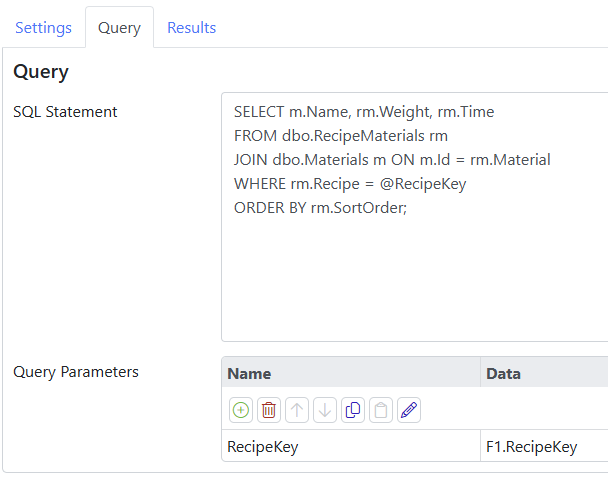
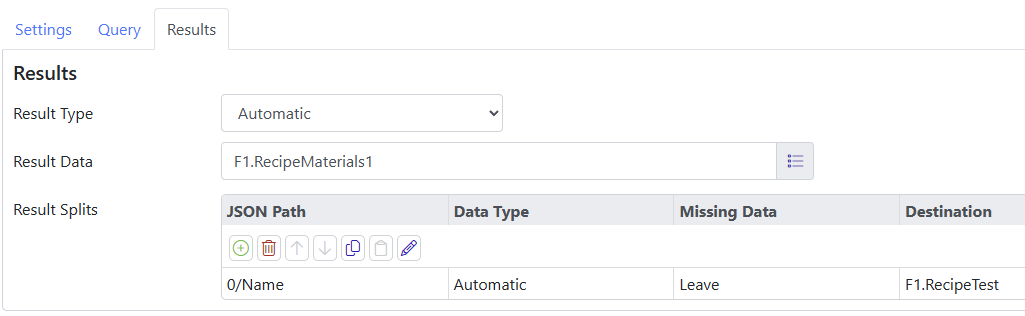
The Results tab is used to define what should be done with the results of the query. Queries that return only a single string or number can store that result in a string or numeric tag, defined by the Results Data setting. That said, most queries return one or more rows of data, and Nova handles this by converting the data to a JSON object or array and storing it as a string. Nova contains powerful JSON manipulation techniques that are described in this article. The same article describes how to use the Result Splits table to parse the JSON into sub-objects or values that can be stored in other tags.
Insert Queries
Insert queries are optimized to execute INSERT statements, and thereby add data to a table. The same operation could be completed with a generic query, but you would have to add each field to the query manually. An insert query takes a single expression that contains a JSON object and uses the fields of that object to construct a list of columns and values to be inserted. The field names in the JSON must thus match the columns of the target table.
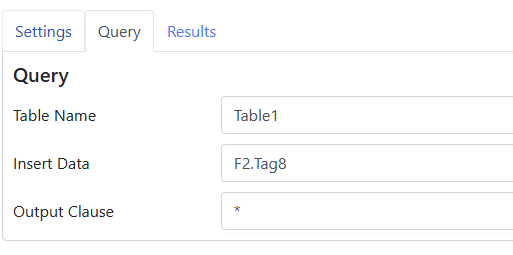
The Output Clause setting allows you to specify the OUTPUT or RETURNING clause, depending on your database’s dialect. This clause can be used to ask for certain fields to be returned by the query, and is often used to obtain the sequentially-allocated key value given to a new row. Note that some databases allow a star to be used here to ask for all columns, while others demand specific column names. Once again, consider using your database’s management tool to validate the syntax.
